How to Provide Every Employee Instant Access to Their Payroll Information — Without a Single HR Request
Every month, after payroll is processed, Nepal HR teams face the same flood: “Can you send my payslip?” “What was my TDS?” “Did my rebate get applied?” Based on our implementation data, HR teams at 100-to-200 person organizations spend Eight (8) to Ten (10) hours per payroll cycle answering questions that a self-service portal eliminates entirely.
Most organizations still spend unnecessary hours managing payroll communication manually. HR processes payroll, then distributes payslips individually, answers tax queries one by one, and collects rebate proof through emails and WhatsApp. RealHRsoft’s ESS Payroll module ends this loop. Employees get direct, secure access to their own payroll information. HR processes payroll once. Employees handle everything else.
The Problem
For a 50-person company, the post-payroll queue is manageable but recurring. For a 200-person organization, it consumes an entire working day — every month, without exception. An HR manager at a Kathmandu-based INGO with 160 staff put it plainly before deploying RealHRsoft: “We were spending two full working days every month just getting payslips out and answering questions. That’s almost a full working month per year — on something that should be instant.” After deploying the ESS portal, payroll-related HR queries dropped by over 80% in the first cycle.
The cost is not just the hours. It is the compound opportunity cost of an HR team that cannot recruit effectively or prepare for SSF compliance because they are trapped in a Payslip clarification and distribution loop that should have been automated years ago.
What Employees Can Access — Without Involving HR
1. Payslip Access and Acknowledgement
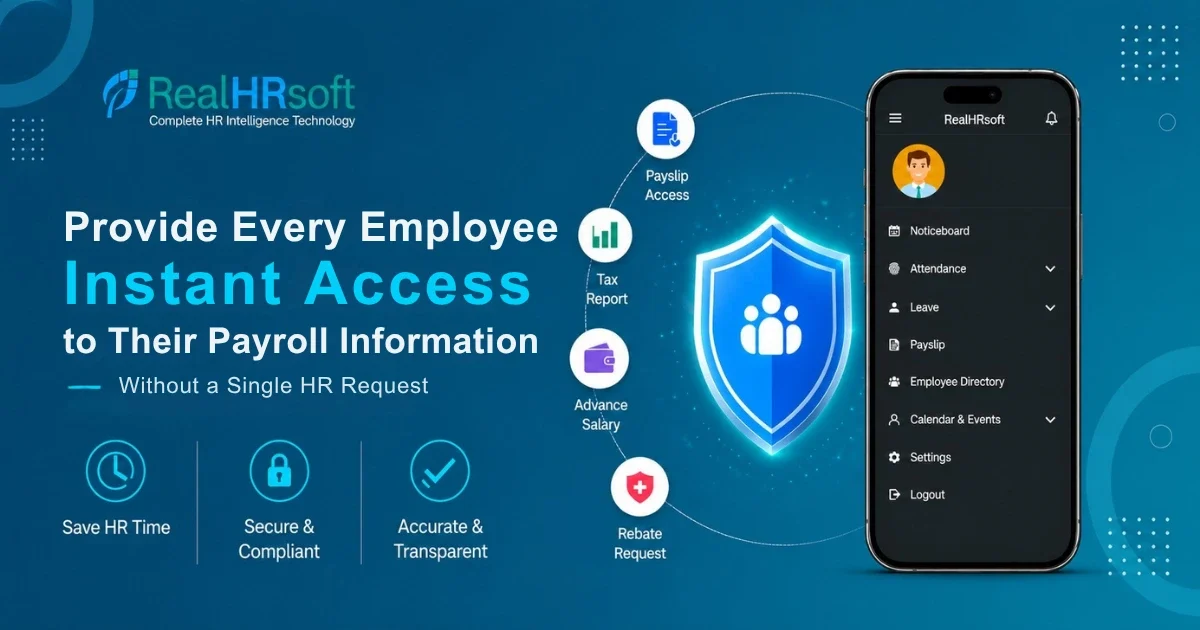
Employees view, download, and acknowledge their payslips the moment HR confirms payroll — no waiting, no request. Each payslip shows the full breakdown: basic pay, allowances, deductions, SSF contributions, TDS, and net salary. If an employee spots a discrepancy, they raise it directly in the portal. HR responds within the same system. The conversation is documented and traceable.
2. Yearly Payslip and Tax Report
Employees access their full fiscal year payroll information history and tax report on demand. This matters especially for employees earning above Rs 40,00,000 annually, who must file personal income tax independently by the end of Ashwin under the Income Tax Act 2058. Under a manual system, every one of those requests lands on HR’s desk during a compressed compliance window. ESS eliminates all of it.
3. Advance Salary Requests
Employees submit advance salary requests through the portal, see their eligible limit, and track approval status in real time. Once approved, the repayment schedule — how much is recovered per month, for how many months — is visible immediately. No follow-up calls to HR required.
4. Rebate Requests — CIT, Health Insurance, Life Insurance, Building Insurance
Employees can submit their rebate claims — for Citizen Investment Trust (CIT), health insurance premiums, and life insurance premiums — directly through the ESS portal. These are the allowable deductions under the Income Tax Act 2058 that HR must collect and process each year to reduce TDS liability. Once HR approves, the rebate applies automatically to the next payroll run — no manual recalculation. This replaces the paper and email collection process most Nepal HR teams run manually.
5. Unit of Work Done — Requests and Tracking
For organizations that pay employees based on output or units of work — incentive-based or production-based compensation — employees can submit their Unit of Work Done requests through the ESS portal and track the approval status. Once confirmed by HR, the amount is integrated directly into payroll.
How It Works — For an Employee
- Log in via the RealHRsoft web portal or mobile app
- Navigate to Payroll — all functions in one sidebar section
- View and download the Payslip — or raise a discrepancy query directly
- Access yearly Payslip or Tax Report
- Request advance salary — submit, track approval, view repayment schedule
- Submit a Rebate Request — upload proof, track status; applied automatically on approval.
Best Practices for HR Teams
- Announce before the first payroll run. Use the RealHRsoft Noticeboard to tell employees payslips are now in the ESS portal — not emailed or printed. Set the expectation before the first cycle or employees revert to messaging HR out of habit.
- Run rebate collection through ESS in Shrawan. Notify employees through the portal to submit CIT, health, and life insurance proof by a fixed date. Employees submit; HR approves in bulk. The manual collection process is replaced entirely.
- Monitor acknowledgement. HR can see which employees have acknowledged their payslips. Following up in week one is significantly more manageable than a month-end query pile-up.
- Enable mobile for field staff. Branch employees and staff on travel access payslips, advance salary, and rebate claims through the RealHRsoft mobile app — no office visit, no HR call.
RealHRsoft Module Summary
| Employee Need | RealHRsoft Feature | What It Does |
|---|---|---|
| View and download payslip | ESS Portal + Payroll Management | Instant access post-approval; PDF download; acknowledgement with remarks. |
| Yearly Payslip and tax Report | ESS Portal — Payroll | Full fiscal year history; tax slip for personal income tax filing. |
| Advance salary | ESS Portal | Submit, track, view repayment schedule — no HR involvement. |
| Rebate claims | ESS Portal — Rebate | CIT, health and life insurance proof upload; auto-applied on approval. |
| Dashain bonus and add-ons | ESS Portal — Payroll Add-ons | Pre-tax items visible before payroll confirmation. |
| Unit of Work Done | ESS Portal — Unit of Work Done | Output-based pay requests submitted and tracked through ESS. |
The Result
When employees can access their own payslips, track their own advance salary, and submit their own rebate claims, the operational load does not reduce gradually — it shifts. The hours HR spent on distribution go back into hiring, performance, and compliance. The monthly queue that resets without exception stops resetting.
Payroll distribution is not HR’s job. It is a system function. RealHRsoft makes one.
Frequently Asked Questions
What is Employee Self Service Payroll ?
ESS payroll gives employees direct access to their payroll information — payslips, tax reports, advance salary request, and rebate request / claims — without routing requests through HR. In RealHRsoft, this covers SSF deductions, TDS computation, and rebate processing as per the law. Employees see their data the moment HR confirms payroll.
Can employees download their own payslips through RealHRsoft?
Yes — immediately after HR approves payroll, employees view and download payslips as PDFs from the ESS portal. They can also acknowledge the payslip or raise a discrepancy query within the same system.
How does ESS handle rebate requests and claims?
Employees upload proof (CIT, health insurance, life insurance) and submit claims through the portal. HR approves in the payroll module. The rebate applies automatically to the next payroll run — no manual recalculation required.
Who benefits the tax report from ESS?
Every employee benefits from access to their payslip, yearly tax report — to verify TDS deducted, for loan applications, visa processing, or personal financial records. For employees earning above Rs 40,00,000 annually, it is specifically required for mandatory independent income tax filing by the end of Ashwin under Nepal’s Income Tax Act 2058. In both cases, the tax slip is available on demand through the ESS portal — no HR request, no delay.
Eliminate payslip queues. Give your team instant access to their records.
See how RealHRsoft’s Employee Self Service Portal reduces HR administrative load by up to 60% — while keeping every employee’s payroll information and tax data compliant, accurate, and always accessible.
RealHRsoft | Emphasize Strategy. Automate HR. | A Product of Aayulogic