How to Manage Salary Advances in RealHRsoft
In Nepal, salary advance requests typically travel through WhatsApp messages, verbal approvals, and spreadsheet logs — with month-end recovery depending entirely on someone remembering to make the deduction. When a single advance spans three months, the tracking burden compounds with every payroll cycle.
The result: missed deductions, duplicate entries, inconsistent policy enforcement, and no audit trail if a Labour Department inspection occurs.
RealHRsoft’s Advance Salary Module handles the entire lifecycle — policy setup, employee request, multi-level approval, and automatic payroll recovery — inside a single platform. Nothing is tracked manually. Nothing depends on institutional memory.
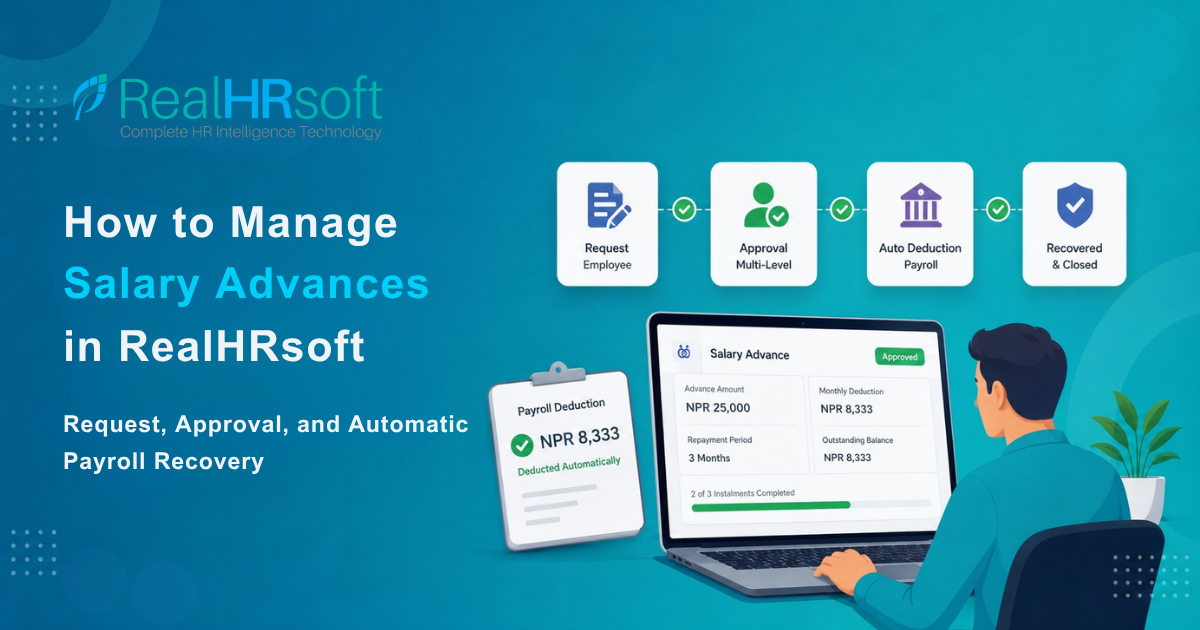
How It Works — Step by Step
Salary Advance Management
1. Configures the Policy
Navigate to Payroll → Settings → Advance Salary Settings to define:
- Eligibility rules (minimum service period, employment type, grade level)
- Amount limits (fixed cap in NPR or a percentage of monthly net salary)
- Repayment terms (minimum and maximum number of months)
- Approval levels (single-level or multi-level — HR only, or HR + Finance + Management)
Every request is then checked against this policy automatically. No manual gatekeeping required.
2. Employee Submits a Request
From Payroll → Advanced Salary → Request Advance, the employee fills in the advance amount, reason, and preferred repayment schedule. The system automatically calculates the monthly installment based on the repayment period selected.
Employees track their request status in real time from the Employee Self-Service Portal. No need to follow up with HR.
For amounts above the configured limit, a separate Surplus Request can be submitted with a reason and routed for additional approval.
3. Approval Workflow
Approvers review pending requests under Payroll → Advance Salary in the Supervisor Portal. HR accesses the same section from the admin panel — viewing the full request, entering remarks, and approving or denying.
4. Automatic Payroll Deduction
Once approved, the Payroll Management module includes the installment deduction in every payroll run automatically — no manual entry. The outstanding balance updates after each cycle. When the advance is fully recovered, the record closes and the audit trail is complete.
For employees who settle manually (cash or cheque), HR records the payment under the Repayment tab with date, method, and supporting attachment.
5. Separation Protection
If an employee resigns with an outstanding balance, the Final Settlement Management module flags the remaining amount for recovery from the final settlement — so nothing falls through the cracks.
Feature Reference
| Feature | What It Does |
|---|---|
| Maximum Advance Limit | Caps the advance amount per request – as a fixed NPR amount or a % of monthly net salary |
| Active Advance Limit | Restricts how many advances an employee can request at one time |
| Eligibility Rules | Blocks requests from employees who have not met a minimum service threshold and employment type |
| Multi-Level Approval Workflow | Routes requests through one or more approval levels — HR, Finance, or Management |
| Recovery Instalment Configuration | Splits the recovery across a set number of payroll months — employer-defined |
| Automatic Payroll Deduction | Once approved, the recovery amount is locked into the payroll engine — no manual entry required |
| Audit Trail & Payroll Register | Every request, approval, and deduction is logged with timestamps |
Every one of these is configurable from Payroll → Settings → Advance Salary Settings. You define the rules once. RealHRsoft enforces them on every single request — no exceptions, no manual oversight required.
How RealHRsoft Helps
Salary advance management is a high-frequency, high-risk HR task. In a 100-employee organisation, if 10% of employees request an advance in a given month, that is 10 individual decisions, 10 recovery schedules, and 10 payslips to verify — every single month. Done manually, this takes hours and produces errors that compound across the fiscal year.
RealHRsoft’s Advance Salary Module removes the manual process entirely:
- Employees submit requests through the Employee Self-Service Portal — no HR intervention required for the request itself
- The Payroll Management Module receives the approved advance and automatically schedules recovery deductions across the configured months
- Every request, approval, and deduction is stored with timestamps — a complete audit trail ready.
- HR’s role shifts from chase-and-track to policy-set-and-monitor.
The result: zero manual tracking, zero missed deductions, and a full audit-ready record — produced automatically, every payroll cycle.
RealHRsoft is a Workforce Intelligence Platform trusted by 25,000+ active users across 100+ organisations. It is purpose-built for Nepal Labour Act 2074, SSF, CIT, and TDS compliance, and is ISO 9001:2015 and ISO 27001:2022 certified.
Automate Your Payroll Recovery
Eliminate salary advance tracking errors for good. Book a live demo and see how RealHRsoft handles advance requests, approvals, and payroll recovery inside a single platform.
→ Start your 15-day free trial — no credit card required at realhrsoft.com
RealHRsoft | Emphasize Strategy. Automate HR. | A Product of Aayulogic