How to Use Work Logs in RealHRsoft to Track Daily Output
Overview
Work Logs in RealHRsoft lets every employee record what they actually worked on each day and let supervisors review, score, and act on that record without a single spreadsheet. Instead of relying on memory at appraisal time or chasing status updates over chat, HR and supervisors get a running, time-stamped account of daily output for every team member, automatically routed for review.
The Problem It Solves
Most Nepali organizations still track work logs informally — a verbal update in a stand-up, a WhatsApp message, or nothing at all. When appraisal time comes, there is no record to point out. Supervisors end up guessing at productivity, disputes over performance ratings and HR has no evidence to support increment or termination decisions. For field staff, remote hires, or project-billed teams, this gap is even more expensive. Hours worked can’t be tied to output, and project costing becomes a manual, error-prone exercise.
RealHRsoft closes this gap by making the daily record easy. The Work Log module gives every employee a one-click place to log tasks, time, and notes the same day the work happens so instead of a memory reconstructed weeks later, there’s a time-stamped entry the moment it’s needed. Supervisors review and score inside the same system, which means the “he said, she said” problem disappears: there’s a single record of what was reported and how it was judged, built up automatically over the year rather than assembled in a panic before an appraisal or audit. And because logs connect to the Task Management module‘s KRA-based tasks and roll into the Performance Appraisal module, output isn’t just recorded — it’s tied back to what the role was actually accountable for, giving HR defensible, audit-ready evidence instead of a guess.
Step-by-Step Process
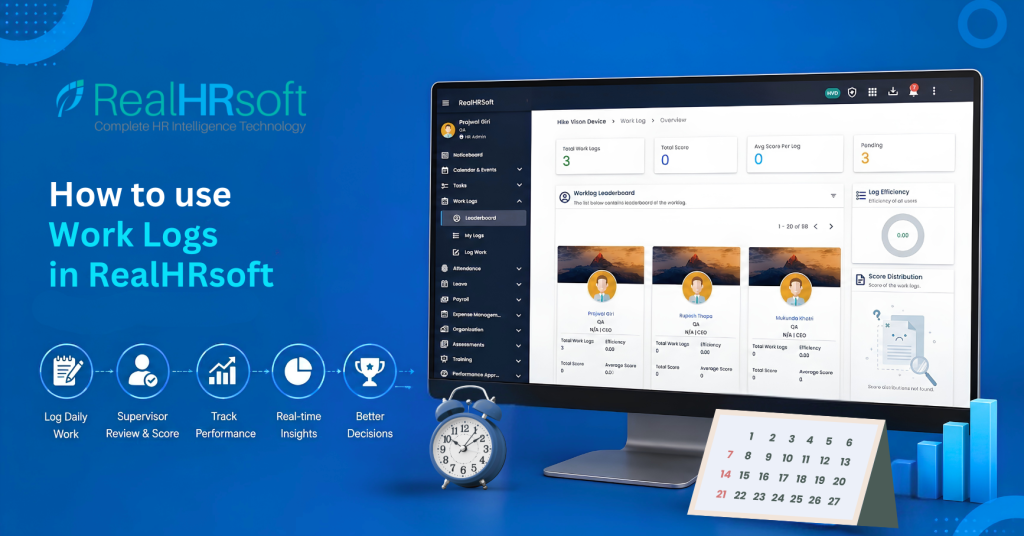
- Open Work Logs from the employee self-service module: Under the Work Logs menu, employees see three tiles: Leaderboard, My Logs, and Log Work.
- Log the day’s work: From “Log Work,” the employee records tasks completed, time spent, and any notes, then submits the entry for the day.
- Track your own history: “My Logs” shows Total Work Logs, Reviewed Logs, and Pending Logs, plus a full log history — so employees can see their own submission pattern at any time.
- Supervisor reviews and scores: The submitted log routes automatically to the employee’s supervisor, who reviews it and assigns a score against expected output.
- Monitor team performance on the Leaderboard: Supervisors and HR view total work logs, average score per log, log efficiency, and score distribution across the team — surfacing top performers and logs that are falling behind, without building a single manual report.
- Appraisal and task data: Reviewed work logs connect to the employee’s broader performance record, alongside Task Efficiency reports, so scoring is backed-up by record.
Best Practices
- Log daily, not weekly: A same-day entry captures details while they’re still fresh — the specific client call, the exact blocker, the task that took longer than expected. Daily work log also gives supervisors real-time visibility instead of a week-old snapshot, so a struggling employee or a stalled task gets noticed faster.
- Keep entries specific: Daily Log tells the supervisor exactly what happened and lets them score it fairly. “Worked on payroll” tells them nothing — it could mean five minutes or five hours of effort. Encourage employees to name the task, the outcome, and any number attached to it (calls made, tickets closed, documents processed) so the log holds up as real evidence, not filler text written just to tick a box.
- Supervisors should review within 24–48 hours: A work log that sits unreviewed loses its purpose fast. If feedback or a score only arrives a week later, the employee has already moved on to five other things and can’t act on it — a backlog of pending logs quietly signals to the team that work log isn’t actually being taken seriously.
- Use the Leaderboard in team meetings: Using Leaderboard in a weekly team meeting — reviewing log efficiency, score distribution, and who’s trending up or down — turns Work Logs from a passive record-keeping exercise into an active coaching conversation. It also makes recognition visible: top performers get called out in front of the team, and employees who are slipping get support before it becomes a bigger performance issue.
- Link logs to KRA-based tasks where possible: When work logs are linked to KRA-based tasks in the Task module, supervisors are scoring whether the person moved the needle on what their role is accountable for. This keeps logging from becoming a box-ticking habit and turns it into a genuine, role-relevant productivity signal.
How RealHRsoft Helps
RealHRsoft’s Work Log module removes the manual chase entirely. Employees submit their log, supervisors give review from the same system, and every log is automatically time-stamped and stored, building an audit-ready productivity trail. Paired with the Task Management module, which assigns tasks against KRAs and tracks completion, and the Performance Appraisal module, which pulls task efficiency and work log scores directly into the appraisal cycle, RealHRsoft turns daily output into structured performance data accurately and automatically. This is what “Emphasize Strategy, Automate HR” looks like in practice: your supervisors spend their time improving employee’s performance, not compiling it.
Automate your team’s daily performance tracking — Book a demo of RealHRsoft’s Work Log module today.