How to Use the Noticeboard in RealHRsoft
Overview
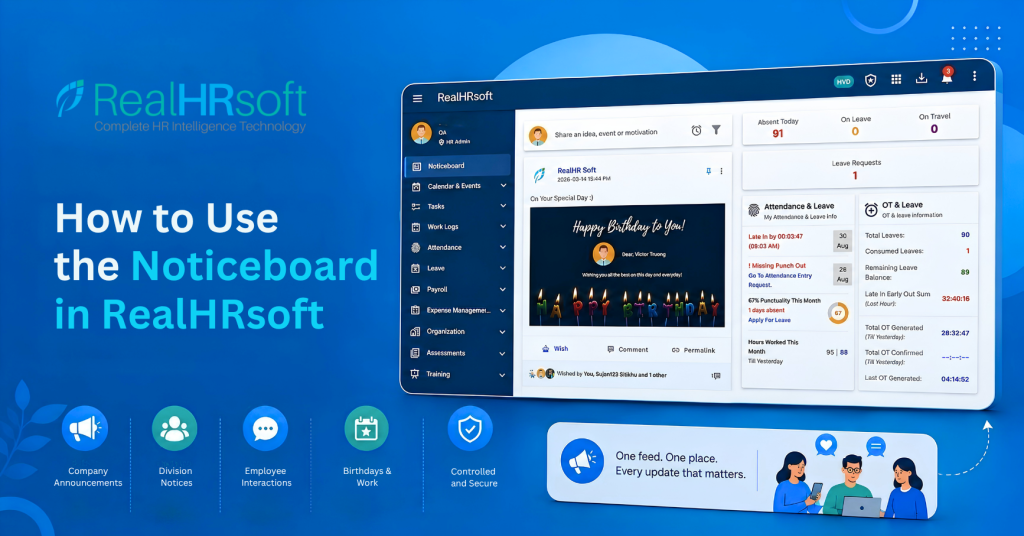
The Noticeboard is RealHRsoft’s built-in communication feature, designed to serve as the single, centralized channel for all internal updates within an organization. It functions as the default screen employees see immediately after logging in, surfacing company announcements, division-specific notices, and day-to-day updates in one continuous feed. Rather than relying on external messaging platforms or physical notice boards, HR teams can manage all organizational communication directly within RealHRsoft with full control over who can post and how content is reviewed.
In simple words, RealHRsoft’s Noticeboard is the first page that pops up immediately after an employee logs in. It serves as a one-stop source for all HR notices, news specific to different divisions, employee messages, and even automated notifications about birthdays and work anniversaries. Employees can respond to posts, making it not just a notice board but an interactive feed.
The Problem It Solves
When company news, policy updates, and team announcements get spread across email, WhatsApp, and printed notices, things might get missed. There’s no single place an employee can check to see what’s actually happening across the organisation, and HR ends up re-sending the same update through three channels hoping it lands. This fragmentation creates delays in critical updates, inconsistent visibility across branches, and dependency on individual employees to manually track, forward, or repost information. Recurring tasks such as birthday and anniversary acknowledgments are easily missed as headcount grows, and there is no centralized record of what was communicated or to whom.
The Noticeboard addresses this by giving every employee a single, automatically visible communication channel from the moment they log in, removing the need for HR to manage multiple platforms.
Getting Started with the Noticeboard
- Post an update: Open the Noticeboard from your dashboard and click “Share an idea, event, or motivation.” Type your message in the text box — this could be a company announcement, a quick shout-out, or a general update for the team. If it helps to add context, attach a relevant image directly to the post. Once you’re satisfied with the content, click Post, and it appears instantly on the feed for everyone to see.
- Post a Division Notice: If your update is only relevant to one department — say, a policy change for the Finance team or a shift change for Operations — click the Settings icon inside the Noticeboard. This opens a dropdown menu where you select Division Notice. Choose the specific division you want to target, and the notice will only reach employees in that division, keeping the main feed relevant for everyone else.
- Control who can post: As an HR Admin, you decide how open or restricted the Noticeboard should be. Go to Switch Organization > Common Settings > Noticeboard. From here, toggle “Allow to post in Noticeboard” to grant employees permission to post their own updates. If you want tighter oversight — for example, to prevent inappropriate or off-topic posts — enable “Need approval to post in Noticeboard,” which routes every employee post through HR for review before it goes live on the feed.
- Birthdays and work anniversaries post automatically: You never have to remember a birthday or work anniversary again. On the exact day, RealHRsoft automatically generates and publishes a shout-out post to the Noticeboard — no HR action, scheduling, or manual entry required. This alone removes one of the most common “small but constant” HR admin tasks.
- Employees comment and interact: Every post on the Noticeboard — a birthday shout-out, a division notice, or an achievement announcement is open for comments. This turns the feed into a genuine engagement space rather than a one-way notice board, giving employees a simple, low-friction way to celebrate colleagues and stay connected to company news.
- No adoption chase needed: Because the Noticeboard is set as the default landing page immediately after login, every employee sees it automatically, every single day — no separate app to install, no channel to remember to check, and no reminder emails from HR asking people to “please check the notice.”
Best Practices
- Use HR Notices for anything official (policy changes, organisation-wide announcements) and Division Notices for anything department-specific.
- Post approval can be turned either on or off according to the organization’s policy. If they want the HR to review the post before they appear on the noticeboard.
- Let the automatic birthday and anniversary posts do their job with no setup but encourage managers to add a comment. A personal note from a supervisor makes the moment land better than the auto-post alone.
- Post the successes of you and your teams manually every time something important happens such as completing a project or making a deal. Achievements usually generate more reactions than anything else on social media.
- Consider building a recurring posting rhythm — a weekly motivational message or a regular round-up of team wins so employees know to expect it and have a reason to come back to the feed regularly.
How RealHRsoft Helps
- Noticeboard Module: Automated, centralized communication. Every announcement, division notice, and company update lives in one feed instead of being scattered across WhatsApp, email, and physical boards. HR posts once, and it reaches the entire organization or a specific division instantly. There’s no need to re-post the same update across five different channels.
- Automated Birthday & Anniversary Engine: Before RealHRsoft, HR had to maintain a separate spreadsheet of birthdays and joining dates, set reminders, and manually post a message on the day — a task that’s easy to forget, especially across a growing headcount. RealHRsoft’s Noticeboard module pulls this data directly from the employee master record and auto-publishes the shout-out on the exact day, every time, with zero manual tracking. For a company with 150+ employees, this alone removes dozens of small recurring admin tasks a month.
- Common Settings Module: Governance without micromanagement. HR doesn’t have to personally review every post or worry about the feed turning into an uncontrolled group chat. From Common Settings, HR sets the rules once who can post, and whether posts need approval and the system enforces those rules automatically going forward. This gives HR oversight without requiring HR to be online and reviewing content all day.
- Default Landing Page: Because the Noticeboard opens the moment an employee logs in, HR never has to send a reminder email saying “please check the notice board.” Visibility is built into the login flow itself, which means announcement reach and read-rates are structurally higher than any channel HR has to actively push.
- Division-level targeting: Rather than every employee wading through irrelevant updates, Division Notices let HR speak directly to the department that needs the information — Operations doesn’t see Finance’s internal memo, and vice versa. This keeps the main feed clean and increases the chance that important notices are actually read.
FAQ
- Can employees post directly to the Noticeboard?
Yes, if HR has enabled “Allow to post in Noticeboard” under Common Settings. If “Need approval to post” is also enabled, employee posts are reviewed by HR before going live. - Do birthdays and work anniversaries need to be manually posted by HR?
No, After the one time set-up. RealHRsoft posts birthday and work anniversary shoutouts to the Noticeboard automatically, on the day itself. - Can employees interact with Noticeboard posts?
Yes — employees can comment on any post in the feed, including automated birthday and anniversary shoutouts, HR notices, and achievement posts. - What’s the difference between HR Notices, Division Notices, and Employee Posts?
HR Notices are official company-wide communications from HR. Division Notices target a specific department or team. Employee Posts are user-generated content for collaboration, idea-sharing, and recognition.
See how RealHRsoft keeps your whole team on the same page. Book a demo.